Posts

D365 For Operations - Upgrade your existing build definition and how to blacklist models in deployment packages

Image
U pdate: Since writing this post, Microsoft has updated their own documentation on how to achieve blacklisting models in the build.   The article can be found here . The Dynamics 365 for Operations Wiki is a great place to gather information about new features and technical documentation for D365.  For example, this page has information on what is new in each of the the Update package. Over the course of the periodic updates, the build definition has added several new features such as automatically updating version number of your models to match the build definitions version number, or allowing blacklisting of models in your deploy-able package (the scope of this post). This is an important new feature, especially for those projects who are utilizing the excellent unit testing framework in D365 (which you should be!).  For example, you most certainly want your unit tests to be build and run as a part of your continuous integration strategy, but when it comes tim...
Dynamics AX 2012 - Visual Studio Team Services Custom Work Item Fields Break Version Control (Error TF237121)

Image
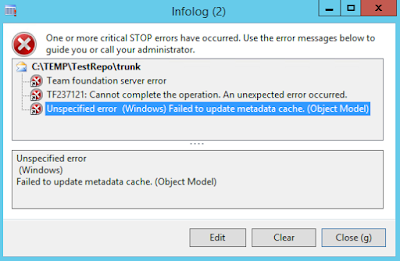
W e've been using Visual Studio Team Services  (VSO) on several projects as or project management and version control solutions for Dynamics AX successfully for several years.  Recently though, AX occasionally presents us with one of these gems when logging into the client: "TF237121: Cannot complete the operation. An unexpected error occurred." and "Failed to update metadata cache. (Object Model)". You may have seen this error before.  Generally, from my experience, this coincides with an update that Microsoft has pushed to VSO. The fix is generally quite simple:  Navigate to C:\Users\[Your User]\AppData\Local\Microsoft\Team Foundation\3.0\Cache and delete all the files in that directory.  You may see several versions; 3.0 is the version AX 2012 R3 uses. Upon clearing the cache and restarting the AX client, the issue goes away and you can happily version control again. However, a few days ago, this fix stopped working for us.  No matter how mu...

Dynamics AX 2012 - The Find dialog and searching for special characters such as double colon "::"

Image
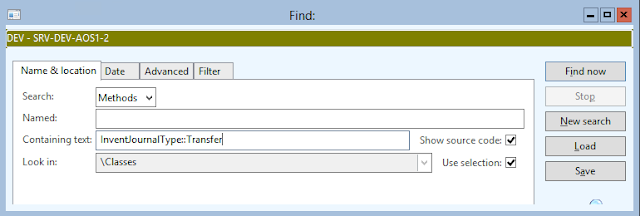
T he Find feature in AX 2012 is an extremely useful tool, but it can be a bit tricky to use, especially when searching for text with special characters. One common example is using the Find function to find all the instances in code where a specific enumeration value is used. Ideally, once would just enter the value, such as in the following screenshot. Unfortunately, the above search will return no results.  Unintuitively, special characters (such as the double colons "::") must be escaped with a back slash in order for them to be treated as literal string characters.  The following search produces the desired results. Other special characters (such as < and >, among others) must also be escaped in this way.  This is because the Find dialog uses regular expressions, which in itself opens up a many options for customizing your search. In fact, the search algorithm uses the AX  match()  function behind the scenes to resolve the search.  D...

Dynamics AX SysFileDeployment Framework - Deploy files automatically (using resources) to the client on login

Image
S ometimes when creating a customization in AX, external files are required to make things happen.  External graphics files, XML or even DLL's may be required by the AX client. For example, a recent customization for my company required a control in AX to drag-select areas of a PDF document, so the user could tell the system where relevant information is located on the document.  AX is far too limited to satisfy this requirement with native UI controls, so I created a .NET managed user control to complete the task.  This control (DLL file) is required to be installed on each client before the form that uses it can be loaded. Herein lies the problem. If your company has only one or two clients connecting to the AOS server, you may be able to just install these missing components manually.  However, when you have hundreds of clients connecting to your server, this quickly becomes a maintenance nightmare of ensuring clients are up to date. The SysFileDeployment ...

Dynamics AX - AIF, Using Asterix (wild card character) in an Criteria Element Find method

Image
W hen consuming AIF services via c#, a common ask is can we write a query similar to a Like statement in SQL. Statements like this one should be possible: (C#) var criteriaElements = new AXCSICustomer.CriteriaElement[1]; criteriaElements[0] = new AXCSICustomer.CriteriaElement(); criteriaElements[0].DataSourceName = "DirParty"; criteriaElements[0].FieldName = "Name"; criteriaElements[0].Operator = AXCSICustomer.Operator.Equal; criteriaElements[0].Value1 = " *bob* "; var queryCritieria = new AXCSICustomer.QueryCriteria() {     CriteriaElement = criteriaElements }; While you can use the '?' wildcard in the  value, AX will strip any other special characters (specifically *",.()<>!= characters).  This happens in the class SysQuery::value() method in AX. One workaround, as found here , is to use the GreaterOrEqual operator.  This essentially turns the query into a "starts with" statement. (C#) criter...

Dynamics AX - Enumerate subclasses of a specific class

A colleague of mine recently asked me if there was a quick way to find all of the classes that extend a certain base class. "But of course there is!" I said.  Here is the code block I sent him, should you, dear reader, need to accomplish a similar task. static void getSubclasses() {     List            subclassList;     ListEnumerator  listEnumerator;     SysDictClass    dictClass;     dictClass       = new SysDictClass(classNum(ExchangeRateProvider)); //Your class here     subclassList    = dictClass.extendedBy();     if (subclassList.elements())     {         listEnumerator = subclassList.getEnumerator();         setprefix(strfmt("%1 is extended by %2 subclasses", dictClass.name(), int2str(subclassList.elements())));         while (listEnumerator.moveNext()) ...

Dynamics AX - A-Job Actions not being generated for a Channel after restoring databases

A fter restoring the model and data databases in AX, the A-Jobs that were working on the environment I migrated from and were not working on the new environment. Specifically, actions were not being generated for the store I was using for the preaction of changing a released product's discount flag (retail fast-tab). Turns out, it's the distribution locations (Retail -> Setup -> Retail Scheduler -> Distribution Locations) that were cached in the Global Object Cache not matching.  Deleting and re-creating the distribution locations fixed the issue. I suspect also clearing the global object cache would have done the trick. See: http://msdn.microsoft.com/en-us/library/hh608239.aspx

Dynamics AX: Remove Empty Code Block Warnings

A X is very picky about having SOMETHING to do inside of a code block.  For example, the compiler will issue the warning "Empty compound statement." when compiling the following code: boolean bob; try {      //fancy code here } catch { } //warning here If you want to suppress this error, you can call Global::exceptionTextFallThrough() method.  This method does absolutely nothing (right click and go to definition to see for yourself), but it does satisfy the compiler enough to remove the warning. boolean bob; try {      //fancy code here } catch {      //This does nothing but suppress the warning       Global::exceptionTextFallThrough(); }

Dynamics AX - Retail Scheduler Gotcha

Image
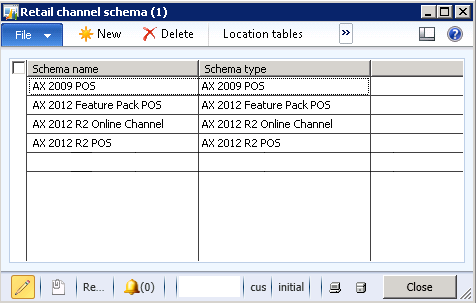
O n a recent project, I ran into a bit of a "gotcha" today around data replication to the Retail POS in Dynamics Ax 2012 R2.  We had created our own schema in order to transfer customized table data to the POS, however, the data would never be written, no matter what we tried.  Before I get to the solution, fist some background on the new Retail Channel Schema in R2. In R2, Microsoft has moved away from a single schema mentality when synchronizing data to the POS.  It is now utilizing a more flexible multi-schema model.  One of the advantages of this model is to allow AX 2012 R2 to seamlessly communicate with both old and new POS versions without issue.  It does this by defining a schema for each version of the POS.  Out of the box, it looks something like this: Notice there are schemas defined for most version of Dynamics AX (this model doesn't support the POS pre-2009).  This will allow the Retail Scheduler to synchronize data between AX 201...

Dynamics AX - Prompt Dialogs & Don't ask again restoration

Image
D ialogs like these are common.  Coding one in X++ is fairly straight forward. public void prompt() {      if (Box::yesNoOnce( "Title" , "Do you want to blah blah" , DialogButton::No, this .name()) == DialogButton::Yes)     {         info( "Do Stuff now" );     } } The trick here is the "Once" of the yesNoOnce method.  This tells AX to show a dialog with the checkmark, and if selected saves the user's choice... somewhere (voodoo magic).  This is all hooked together by the last parameter: str _owner (set to this.name() in the example).  This links the prompt to a key, which can be anything ("bob", "jaffa cake", etc..).  More info can be found in the documentation . The next time the dialog is code is called, the previous selection is honored.  So in the case of the code above, if the user had selected Yes and chose to not be prompt...

SQL Reporting Services - Viewer broken in Non-IE Browsers: FIX

Image
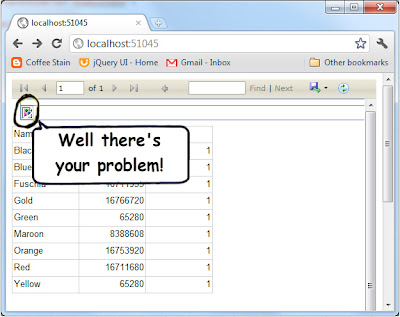
Download Source SSRS Browser Fix Installer A while back I was tasked with getting SQL Reporting Services reports rendering in MVC while deployed on the Cloud with Windows Azure, and the reports must render in IE, Firefox and Safari.  The scenario is somewhat similar to trying to ride a bicycle backwards while chewing bubble gum and reciting the last 18 pages of the 2nd volume of War and Peace... in Russian.  I was eventually able to complete the task, though it was not without much hair pulling and profanity.  That solution involved using local reports, an embedded Report Viewer control, and a custom state manager (I may blog about that later if there is any interest). Fast forward to my current project, and Lo And Behold there is a requirement for a cross browser reporting solution using SSRS (though thankfully this time sans Azure).  The difference here is we are able to use the SSRS Reporting Server's Report Viewer as opposed to embedding our own.  Ho...

MVC - Selectively Loading jQuery Debug or Release Scripts

Image
Download Project Source P age load times are critical to a satisfying user experience.  One of the simplest ways to reduce load times is to Minify your jQuery and Javascript files.  I won't go into detail on how to Minify those files in this post (hint:  http://yui.2clics.net/ ).  Instead, this article deals with the headaches of debugging Minified files. For example, here's a typical Javascript error: However, its impossible to debug this issue because I'm referencing the Minified version of jquery-1.5.1.  I'd have an easier time defusing a small nuclear device.  On the other hand, I don't want to go referencing debug versions of Javascript files throughout my code only to have to do a search and replace every time I want to release. The solution is in MVC's Html Helper classes. The @ Html and  @ HtmlHelper methods are provided to render html controls on the view in a code-centric way.  However, their functionality isn't ...

jQuery - Magic Grid Filters using jQuery

Image
Download Project Source View Demo Update: I've uploaded a demo page showing grid filters in action.  It can be found here . Q uite often there's a grid or two (or hundred) in a project.  One of the neat thing about jQuery is how simple it is to do some really amazing things, such as filtering grid content based on user input. Take the following example: the above grid has several Employees listed, but the user only wants to see Michael Bolton's information.  With jQuery, it is possible to remove grid rows that don't match the user's selection, with just a few lines of code.  Here's how. First, we create a view page listing the employees.  The key here is to decorate the table rows and cells with CSS classes so our jQuery function will search only where we want it to. Code Snippet < table >          < thead >          < tr > ...